Liberty Notes: A Patriotic Serif for Bold Designs
When a project calls for a typeface that does more than just spell out words, when it needs to evoke a feeling, tell a story, or capture a specific cultural moment, the search for the right premium font becomes crucial. Enter Liberty Notes, a creative font that merges classic serif structure with vibrant, thematic ornamentation. This isn't your standard text typeface; it's a display font designed for impact, nostalgia, and celebration.
A Distinctive Blend of Tradition and Celebration
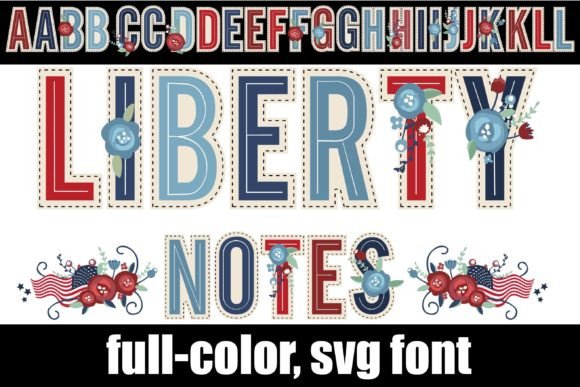
At its core, Liberty Notes is a serif font with a familiar, approachable skeleton. The letterforms are clean and legible, providing a solid foundation for communication. However, its true character is revealed in the details. Each letter is adorned with a red, white, and blue floral motif, a design choice that instantly infuses the text with a sense of Americana, heritage, and festive energy. This unique blend makes it a powerful tool for projects around national holidays, historical themes, or brands that want to convey a timeless, patriotic spirit.
The personality of this typeface is one of confident celebration. It’s not loud or garish; instead, its charm lies in the intricate integration of the floral elements within the letterforms. The style leans towards a traditional, almost craftsman-like aesthetic, making it perfect for projects that aim to feel authentic, handcrafted, and full of character. It’s a design asset that can single-handedly set the tone for an entire visual identity.
Where Liberty Notes Truly Shines
Understanding the strengths of a font like this is key to using it effectively. Its decorative nature means it excels in applications where a single word or short phrase needs to command attention. Think of it as the headline act, not the supporting player in your typography lineup.
- Branding & Logo Design: For businesses in the food and beverage, retail, or event planning sectors, especially those with a patriotic or vintage theme, Liberty Notes can form the cornerstone of a memorable brand identity. Imagine it on a label for a small-batch barbecue sauce or the logo for a Fourth of July festival.
- Editorial & Publishing Design: In editorial design, use it for chapter titles, pull quotes, or feature story headers in magazines and books focused on history, travel, or culture. It adds a layer of visual interest that standard fonts cannot provide.
- Packaging & Product Design: This font is a natural fit for packaging design. It can elevate products on a shelf, telling a story of quality and tradition before the customer even reads the description. It works beautifully on everything from gourmet goods to artisanal crafts.
- Digital & Social Media: While a complex display font, it can be incredibly effective in web design for hero section titles or in social media graphics for event announcements, holiday sales, and celebratory posts. Its visual punch stops the scroll.
- Personal & Craft Projects: For crafters and hobbyists, Liberty Notes opens up a world of possibilities. Use it to create stunning invitations, personalized wall art, custom apparel, or scrapbook embellishments with a distinct, professional flair.
Practical Guidance for Designers and Creators
Choosing a creative font is just the first step. Using it wisely is what separates good design from great design. Here’s how to approach integrating Liberty Notes into your workflow.
Font Pairing and Visual Hierarchy
Because Liberty Notes is so detailed, pairing it effectively is critical. The goal is to create contrast and ensure readability. The best partners are often simple, clean typefaces. A classic sans serif font like Helvetica, Futura, or Open Sans can provide a modern counterbalance. Alternatively, a simple script font or a clean handwritten font can complement its friendly, crafted feel without competing for attention. Use Liberty Notes for your H1 or main title, and let its paired font handle body text and supporting information. This establishes a clear visual hierarchy that guides the reader’s eye.
Technical Considerations and Installation
Liberty Notes is an OpenType full-color (SVG) font. This is modern typography technology that allows for the rich, multi-colored details you see in the preview. Installing it is straightforward: treat it like any standard .otf font file. On a Mac, use FontBook. On Windows, use your preferred font manager or the Control Panel. A key point to remember: not all software supports color fonts. In non-compatible programs, the font will appear as a standard black silhouette. Even in compatible programs, the font preview window might show it in black. The true test is to type on your canvas. If you see the red, white, and blue, you’re good to go. Major platforms like Adobe Creative Suite, Silhouette Studio, Quark, and Inkscape currently offer full support.
Readability and Licensing
Given its ornate nature, Liberty Notes is best reserved for short, impactful text. Using it for long paragraphs of body copy would hinder readability and dilute its special effect. Always test your designs at the intended viewing size, whether for a small product label or a large banner. Furthermore, as with any commercial font, ensure you have the correct license for your project. If you’re designing for a client or for commercial sale, you need to confirm the font’s license permits such use. Respecting font licensing is a mark of a professional and protects both you and your clients.
Liberty Notes is more than just a font; it's a thematic tool. By understanding its personality, knowing where it shines, and applying it with strategic care, you can leverage this unique typeface to create designs that are not only beautiful but also rich with meaning and resonance.