Get Crayons: A Playful SVG Font for Vibrant Designs
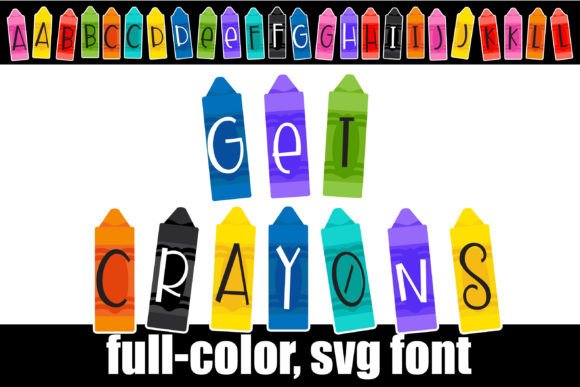
Let's be honest, sometimes your design needs a jolt of pure, unadulterated fun. You're working on a project for a children's brand, a creative workshop, or a social media campaign that needs to pop off the screen. The standard sans serif font feels too corporate, and a script font might be too formal. This is where a unique premium font like Get Crayons enters the picture. It’s not just another typeface; it’s a full-color SVG font where each letter is crafted to look like a little crayon, complete with a whimsical, hand-drawn charm. This isn't about subtle elegance; it's about injecting personality and color directly into your typography.
Understanding the "Full-Color" SVG Magic
Before we dive into applications, let's unpack what makes Get Crayons technically special. It's an OpenType full-color font, often called an SVG font. This means the color information is embedded directly into the font file itself. When you install it like any standard .otf font—using FontBook on a Mac or your Control Panel on Windows—you're unlocking a design asset that goes beyond simple outlines.
A crucial point to remember is compatibility. In programs that don't support this advanced modern typography feature, Get Crayons will appear as a simple black outline. You might also see it as black in the font preview window, even in compatible software. The real test is when you type on your canvas. If you see the colorful crayon letters, you're good to go. As of now, major players like Adobe Illustrator, Photoshop, InDesign, Silhouette Studio, QuarkXPress, and Inkscape fully support these vibrant design assets. This compatibility ensures your creative vision translates accurately from screen to final output.
Where This Creative Font Truly Shines
The strength of Get Crayons lies in its specific, joyful aesthetic. It’s a display font at heart, meaning it's designed for impact in short bursts rather than for setting long paragraphs of body copy. Think of it as the headline act, not the supporting text.
- Branding & Packaging: For a kids' toy line, a daycare center, an art supply store, or a bakery with a playful vibe, this sans serif font alternative can become the cornerstone of a memorable brand identity. Imagine it on product labels, shopping bags, or store signage.
- Digital & Social Media: Grab attention in crowded feeds. Use Get Crayons for Instagram story headlines, YouTube video thumbnails, Facebook event graphics, or website banners promoting a sale. Its color and texture are inherently engaging.
- Editorial & Publishing: It’s perfect for chapter titles in a children's book, headers in a parenting magazine, or section breaks in a creative blog. It sets a tone of fun and approachability instantly.
- Events & Personal Projects: From birthday party invitations and school project covers to custom t-shirt designs and scrapbooking, this creative font adds a handmade, celebratory feel.
The key is context. A law firm's annual report? Probably not. A community fundraiser for a local park? Absolutely. It influences brand perception by signaling creativity, approachability, and a sense of fun.
Practical Guidance for Using Get Crayons
Adopting a full-color SVG font requires a slightly different approach than your everyday serif font or script font. Here’s how to integrate it effectively into your workflow.
Evaluating Project Fit and Readability
First, audit your project's goals. Is the primary aim to be whimsical, youthful, and energetic? If yes, Get Crayons is a strong candidate. If the goal is to convey luxury, seriousness, or minimalist sophistication, you should look elsewhere. Its inherent personality is its greatest strength and its main limitation.
Readability is paramount. Because each letter has a textured, crayon-like shape, legibility can decrease at very small sizes or in long strings of text. Always test it. Use it for logo design, short headings, and call-to-action buttons. For body text, pair it with a clean, neutral sans serif font like Helvetica, Arial, or Open Sans. This font pairing creates a balanced visual hierarchy: the Get Crayons headline grabs attention, and the companion font delivers the detailed information clearly.
Technical and Licensing Considerations
When you license Get Crayons, check the terms for commercial use if you're creating client work or products for sale. Most premium font licenses from reputable foundries cover a wide range of uses, but it's your responsibility to verify. Look for details on the number of users, permitted projects (print, digital, merchandise), and any restrictions.
Since it’s a vector-based font, it scales beautifully for large-format prints like posters or banners without losing quality—a major advantage over rasterized graphics. However, remember that the final appearance depends on your software's support. Always do a test print or export a PDF to ensure the colors render as expected in your final deliverable.
Ultimately, Get Crayons is more than just a novelty. It’s a specialized tool in your modern typography